

Diving into the World of AI Summarization
This summer, I had the incredible opportunity to intern at Tinkertanker, where I worked on developing a summarisation app. As a Year 3 Computer Science student at NTU, I was eager to expand my knowledge and skills in the space of technology. This project provided the perfect platform to do just that.
The Summarisation App: What It’s For and Why We’re Building It
The summarisation app I worked on is designed to help users quickly and efficiently summarise large amounts of text. Whether it’s academic articles, lengthy reports, or even entire books, our app leverages AI APIs to provide concise and coherent summaries. The motivation behind this project is to save users time and effort, making it easier for them to grasp essential information from extensive texts.
Learning and Overcoming Challenges
Throughout my internship, I delved into various aspects of AI and machine learning. I learned how to implement and fine-tune models using frameworks like OpenAI’s GPT-4. One of the significant challenges was optimizing the model to produce high-quality summaries consistently. This involved a lot of trial and error, tweaking hyperparameters, and refining the prompts needed.
Another critical aspect was ensuring that the app’s UI/UX was intuitive and user-friendly. I worked closely with the Tinkertanker team to incorporate feedback and improve the interface. This included formatting the results better, rephrasing developer-centric language to be more user-friendly, and ensuring consistency in language use.
Additionally, I faced challenges trying to host the backend on multiple servers like Glitch.com, Vercel.com, and finally hosting it locally on their local server via Docker. Dockerizing the application presented its own set of challenges, particularly in managing dependencies and ensuring the container ran smoothly across different environments. Keeping all the API keys secure was another hurdle, as even a single misstep could expose the .env credentials to the public.
How It Works
The summarisation app uses a Python-based backend with Flask as the web framework. It interacts with the OpenAI API to generate summaries. Here’s a brief overview of the tech stack and workflow:
- User Input: Users can paste the link they want to summarise or upload a document from their Google Drive.
- API Call: The app sends the text to the OpenAI API, which processes it and returns a summary.
- Display Results: The summary is formatted and displayed in a user-friendly manner on the web interface.
Screenshots
Here are a few screenshots showcasing the app:
The home page of the summarisation app, where users can input text or upload documents.
A sample summary result generated by the app.
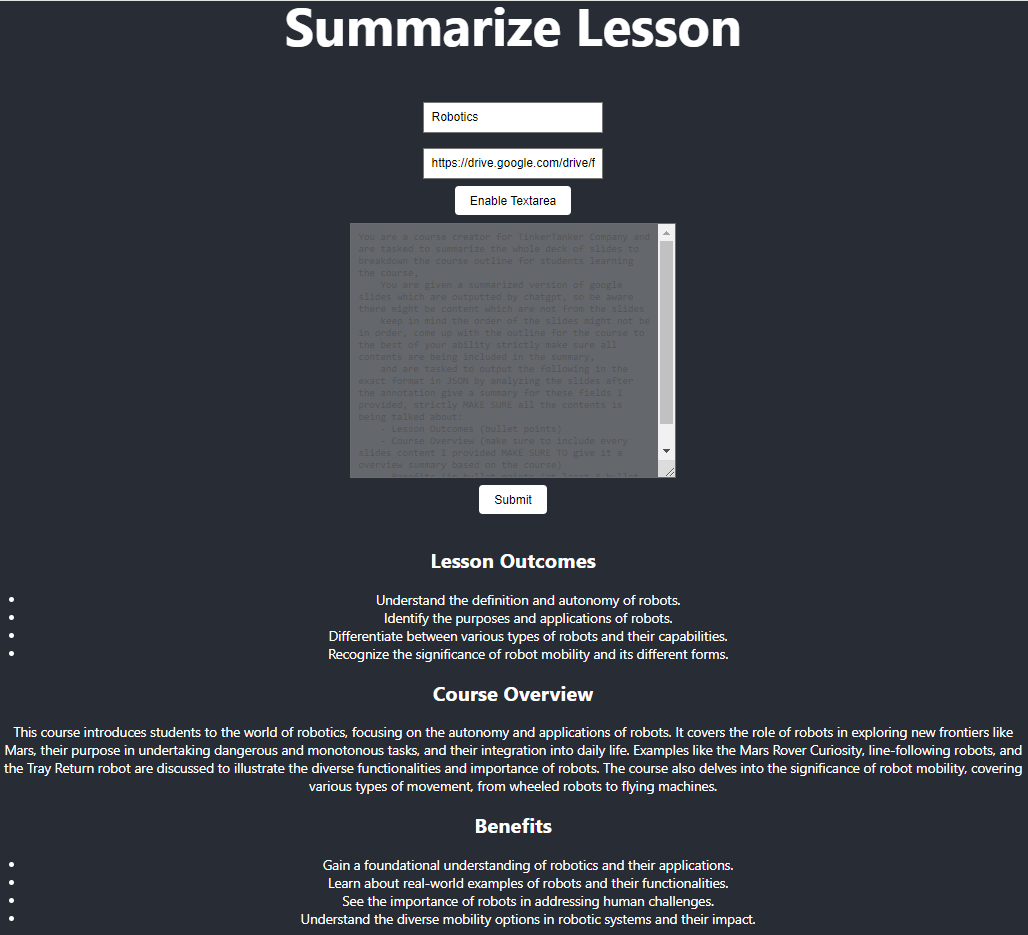
Moving forward, we aim to keep the data neater instead of just presenting it as-is.
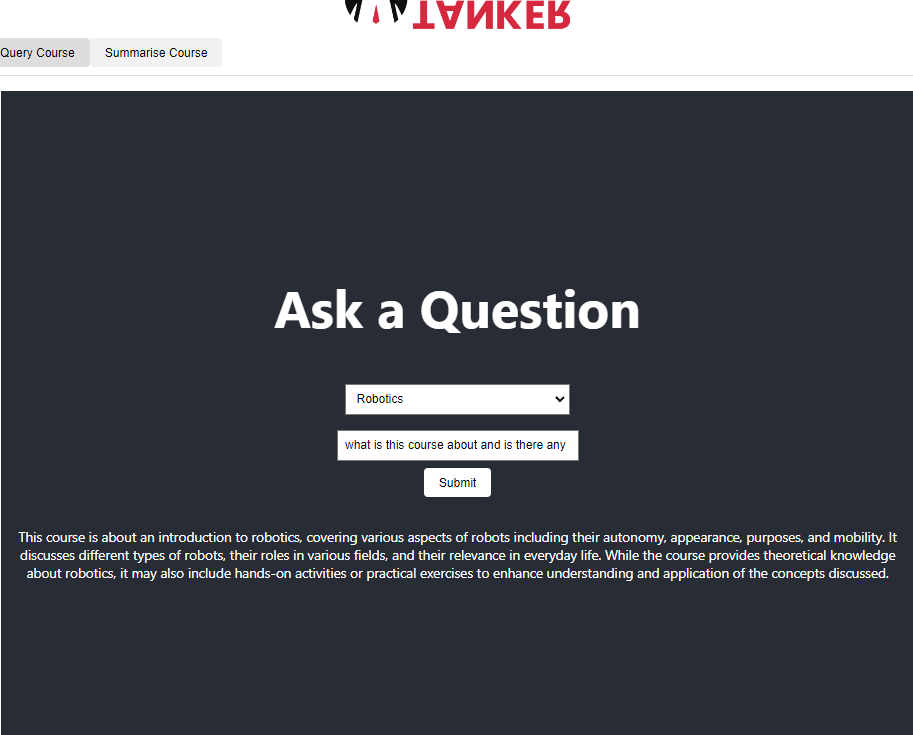
Results would then be saved in our database and be used to query any questions related to the course later on.
A sample question query result generated by the app.
Reflecting on the Experience
Working on this project was an incredibly enriching experience. I gained hands-on experience with many new frameworks, enhanced my coding skills, and learned the importance of user-centered design. The collaborative environment at Tinkertanker allowed me to interact with talented professionals who were always willing to share their knowledge and provide guidance.
Looking Ahead
As I conclude my internship, I feel more confident in my abilities and excited about the future. I plan to continue exploring Large-Language Models, building on the foundation I developed during this internship. The skills and experiences I gained at Tinkertanker will undoubtedly be invaluable as I pursue my career in technology.
Thank you to the entire Tinkertanker team for this incredible opportunity and for making my internship a memorable and transformative experience.