

Editor’s note: In early 2018, Daniel called us, looking for something to do after completing his high school education in Singapore. We were a bit confused about what to do with this affable New Zealander, but after we hosted him as a sit-in student for a few months, we invited him to join us as a full-fledged intern. He came in without any programming experience, and by the time he left, he was off to study Computer Science at the University of Waikato. Here’s his remarkable story.
Beginning
At the start of 2018, I heard about Tinkertanker through word of mouth, and applied for an internship without really knowing much about the company. I was expecting to be packing boxes, do busy work at the office, or something suitably boring for an intern.
What I did not expect, however, was that I would learn game development, several programming languages, develop and release multiple mobile apps, get to work with hardware like Micro:bit and Raspberry Pi, and learn some backend web dev. (I did still pack a couple of boxes, and—just one time—manually counted 900 LED strips.)
Coming in with very little (basically zero) programming experience, I started by going through Tinkercademy’s curriculum on Game Development in Unity, learning both C# and Unity, and giving feedback on the curriculum. For a first-time coder, this was a little challenging, but learning programming through game dev was a lot of fun. The interactive medium of video games makes learning a fun experience—rather than build a calculator, I could make a character and program how it moved! Though it’s subjective, of course, I personally found this approach more engaging than previous attempts at learning programming through more traditional means.
After a couple of months, I started my actual internship, and began to help out with some classes, including a Unity class, and work on other projects. The first big project of my internship was the Digital Maker competition.
Digital Maker Competition
We ran a competition with schools in Singapore to design and build controllers, using micro:bits, for a game built in Unity and based off Unity’s “Tanks Tutorial” that we called Tank Tinkerer. (More on the game and competition in this blog post.)
Tank Tinkering
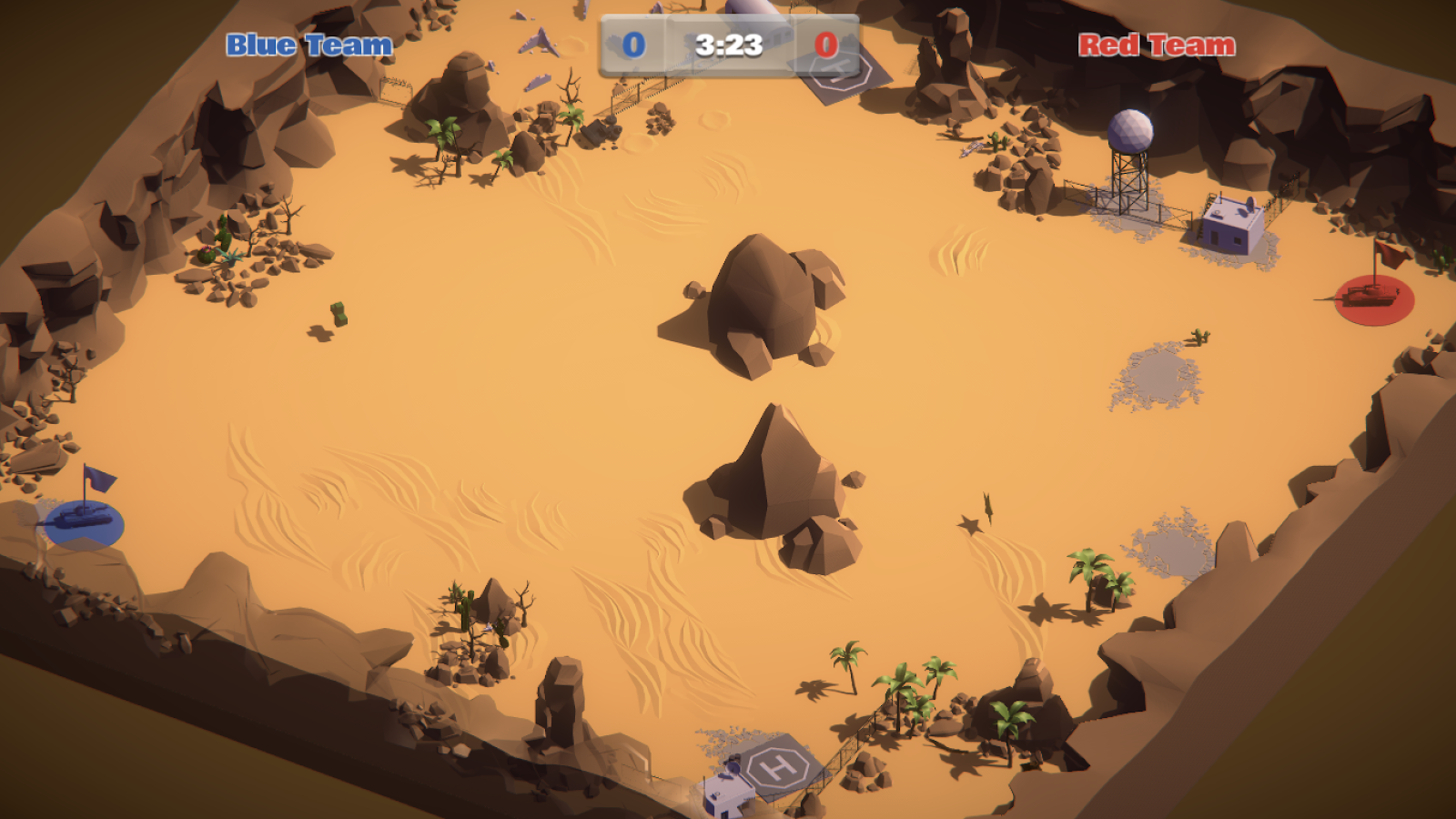
Tank Tinkerer is a team-based game where players square off in a 2v2 match of Capture The Flag. Each team controls 2 tanks which move around the level and can fire on enemy tanks (or friendly ones, friendly fire was enabled, sometimes to hilarious effect). The goal, of course, is to get to the enemy team’s base and grab their flag, then bring it back to your base alive.
Teams were invited to Suntec City for Tech Saturday 2018 to compete against one another, playoff-style, with their controllers, which were paired using micro:bits connected by serial ports. In preparation for the big event, I was tasked with adding some last minute features and quality-of-life improvements to the game.
The game in its current state did the equivalent of refreshing a web page when going back to the main menu after a match. Though this worked fine for earlier segments of the competition, we had a tight time schedule, about 5 hours to get all of the round-of-16, round-of-8, and playoffs done, so downtime between matches had to be minimal. Constantly re-entering serial port numbers for the controllers needed to go, but some data like scores, game time and game state still needed to be reset. We also needed to be able to pause or quit during a game in case of unforeseen issues. Since all the systems currently relied on reloading the scene (a scene in Unity Engine being a game level) to reset their states, I needed to rework them all to work properly in the new version which would never reload the scene.It took me a day or two to get all the systems updated and do some basic tests, after that I added a couple of preset game lengths, one for group stages and a second, slightly longer one, for playoffs.
To minimise tie games, an occurrence that wasn’t so much of an issue in the earlier stages of the competition, but one that would be very problematic in the time-limited scenario of playoffs, I added sudden death mode.When active, sudden death prevented respawning, this meant that the first team to score a frag would be able to freely capture the enemy flag and win the match.
We ran play tests in the office to make sure everything worked, and though everything appeared fine. I was still very nervous—after all, it was my code and what if everything went wrong on stage, what would we do?
Thankfully it didn’t, everything went remarkably smooth and despite a couple of small f̵e̵a̵t̵u̵r̵e̵s̵ bugs, we managed to finish the competition within our incredibly tight time constraints.
So far I’d gone from no programming experience to working on a game that was played by hundreds of people, at a live event, on a stage. I was becoming very excited about programming and software development, but so far I had only learned one language, C#. Though the majority of my internship was spent using C# and Unity, I also learned Python, JavaScript, and Ruby during my time here.
SCCL App Development Comp
The next, and by far the biggest project I worked on was the App Dev Competition for the Singapore Centre for Chinese Language (SCCL). SCCL ran a competition with us for secondary school students to develop mobile apps or games with the aim of helping primary school students improve their Chinese speaking and reading abilities. The prize for making it into the top 20 was getting their app released on mobile stores, and this is where my role came in.
There were two categories for the competition, Open Category (OC) and Secondary Category (SC):
- OC teams developed the final versions of their apps themselves, only handing them over to us for publishing.
- For most of the SC teams, this was their first attempt at app development or even programming at all, so they built a functional prototype, mostly using Thunkable, a block-based app builder, and then we developed the final release version with all their features, keeping the same look and feel of their original idea.
We chose Unity as our platform due to the way it makes releasing on multiple platforms very easy, and we wanted to release all the apps we developed on both Android and iOS.(OC teams could choose which platform they wanted to develop for, several also chose Unity.)
I learned a lot over the course of this project which spanned several months, working in a team of developers, all of different experience levels with C# and Unity.
- Developing for mobile devices rather than computers introduced its own challenges, like making sure the apps worked at lots of different aspect ratios and resolutions, it also made testing harder since, in order to get a realistic experience, you had to build the project, then open it in Android Studio or Xcode, and build it again for the simulator or your device.
- We also needed to co-ordinate with the students who made the apps to make sure we got everything just right.
- This was the first time I worked on projects and code that would end up being distributed on a store which meant that, unlike tutorial projects and such, these needed to reach a state of releasable polish.
- I also became very familiar with the Google Play Store and Apple App Store releasing procedures after publishing multiple builds for 20 apps.
Ruby on Rails
After wrapping up the SCCL project, I moved on to learning back end web development using Ruby on Rails.
This was a big change of scenery from what I had been doing prior, and although I found Ruby itself to be very friendly to pick up, I had trouble getting my head around Rails and the MVC structure, but it was very satisfying when something finally made sense and I could understand how it worked.
Prior to using Rails, my knowledge of web development was just typing plain HTML and a bit of JavaScript, so using Rails was eye opening. When making my first website for a class in high school, I had often times thought, there must be a better way than this, and web frameworks were that better way, at least when it came to bigger sites. I had been imagining painstakingly typing out HTML for every page on a massive site like Facebook or Twitter.
I ended up really enjoying Ruby on Rails and I plan to further continue learning Rails in my free time during university.
A Processing program with Python
While the SCCL project was ongoing, it didn’t take up 100% of my time until later. I started learning Python so that I could assist and lead classes that use it, I also got some experience with the Raspberry Pi while using it along with Minecraft Pi to facilitate teaching Python. One of the classes that I had been involved in used Processing and Python to teach programming with digital art.
Processing provides a programming environment with access to a digital art focused library that lets you create and animate shapes using various programming languages, we were using Python.
One thing that I noticed was that it was hard for some (myself included) to visualise art in the coordinate grid of Processing’s canvas.
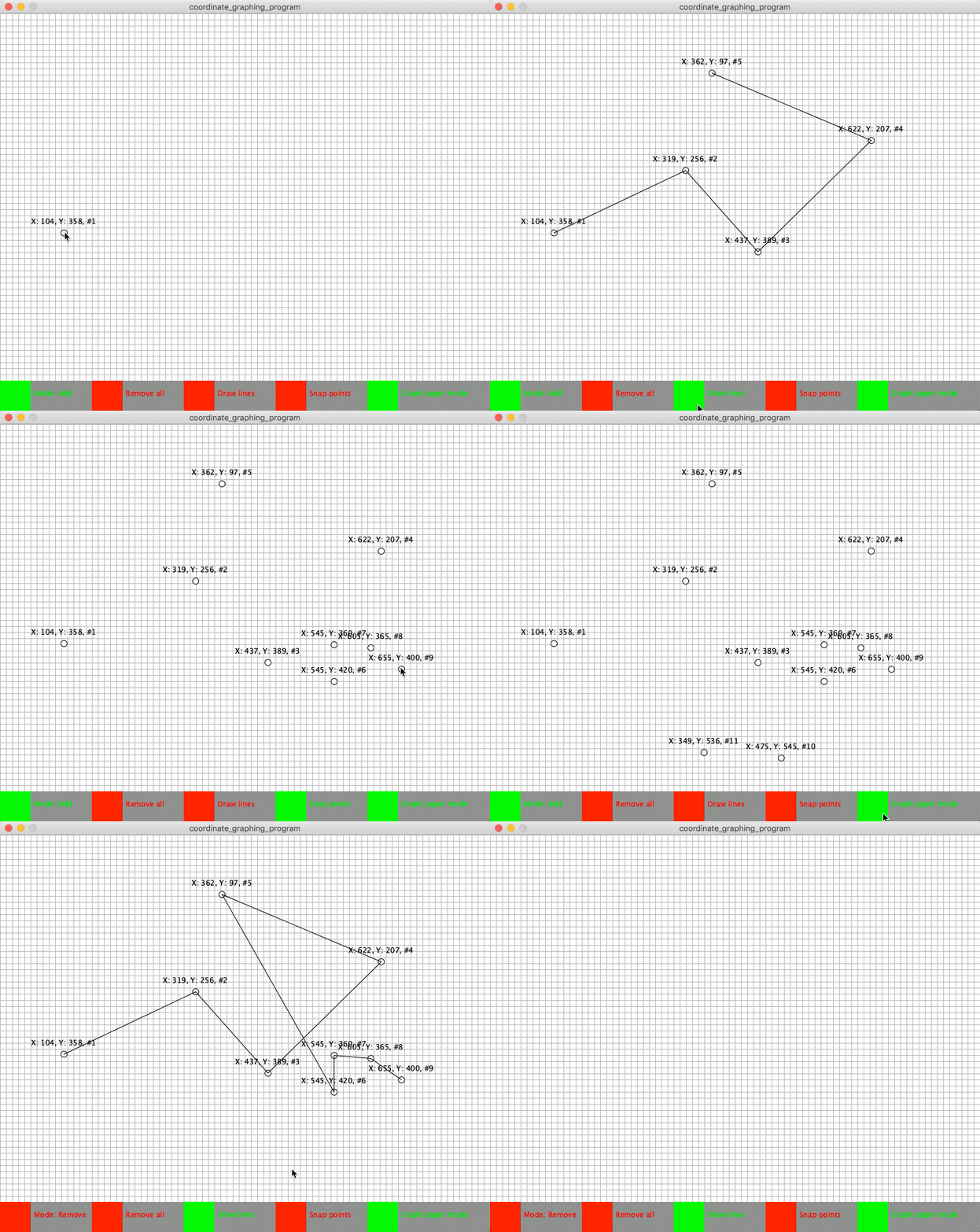
While preparing for a class in early December I was searching for an online coordinate point plotter to help with this, and although I found 2 or 3 sites that sort of worked, they were all lacking in one way or another, mostly focused towards mathematics and not just plotting a point with an x and y number above it. I started thinking of making one myself, can’t be that hard right?
I spent some time thinking about it, and even made an early attempt at it, but didn’t get far as I wasn’t familiar with Python objects.
Coordinate plotter in Processing using Python.
Fast forward to mid-January when I had finished the Ruby on Rails tutorial and was looking for something to do, I decided to give the coordinate plotter another go.
This time, I actually made good progress, and finished the program according to my initial plan in 3 or 4 hours.
I’d had a lot of fun making it and wasn’t ready to be done quite yet, so I started thinking of more features to add.
I showed it to a co-worker and he suggested I add the ability to connect the points with lines and allow the points to snap to the nearest 5 or 10, and to remove or have an option to toggle the graph lines.
Final project on GitHub.
This was a fun little project to work on, and was useful too. Not only did I get to practice my Python, specifically objects, but it also resulted in a tool that can be used for future classes, or even turned into a lesson in itself.
Closing
Over the course of my internship I got to experience a lot of different technologies and choose where and what I wanted to work on. Some other things I did:
- An afternoon’s experimental Stellar class gave me an introduction to the world of blockchain.
- Helping out at a 4-day ethical hacking camp, which got me to learn a lot about networking and how the internet works.
- Designing activities for Primary 4–5 students using colour tracing robots, and a R2D2 robot made out of snappable circuits called littleBits.
- Teaching classes on Python and Raspberry Pi.
Working at Tinkertanker was a great experience. Walking through the open plan office area, nearly every desk has some kind of project being worked on, people busy coding or working on cardboard contraptions, micro:bits, circuitry, or combinations of everything I just mentioned.
Though everyone has their own desk in the office, you are free to sit wherever you want. On days when no classes were being conducted in the classroom you would often find several interns and full timers working there, or on the beanbags or in the pantry.
I learned a lot from the full timers here, who were great mentors, but also from other interns, who I got to meet many of during my nearly 11 month internship.
I am writing this nearly 1 year after I started, during the last few weeks of my internship—and my time in Singapore for that matter—before I move back to New Zealand to start my Computer Science degree. A year ago, I had no interest in pursuing a university degree, let alone one in computer science, but this internship helped me find something I am passionate about and want to pursue further.
Editor’s Note: Daniel is now a first-year student at the University of Waikato in New Zealand, studying Computer Science. When he first asked to “join” us by coming in, unpaid, to learn from our curriculum and provide feedback, we thought, why not? The worst that could happen was he might stop showing up. (We offered someone else the same deal at the time, and we never heard from him again after a couple of days.)
Daniel never stopped showing up. He persisted, he learned a whole bunch of programming languages and frameworks, he worked well with the other interns and full-timers, we had no qualms taking him on as a full intern, and we’re happy to recommend him for any future internships, academic programmes, or jobs in the future.